Mobile connecting Method

 For 5G


Amrita-5G-XXX(XXX mean Room number  For Example Amrita-5G-A101 )

Click to Advanced options


Select Use device Mac for default randomize mac 

If you select the randomize MAC option every time, it will automatically change the MAC..


For 2.4G


Amrita-2.4G-XXX(XXX mean Room number  Amrita-2.4G-A101)

Click to Advanced options


Select Use device Mac for default randomize mac 

If you select the randomize MAC option every time, it will automatically change the MAC..


For Both 2.4G and 5G Default have randomize mac


Attempt to connect primarily to the 5G frequency. Use the 5G frequency to achieve faster speeds.

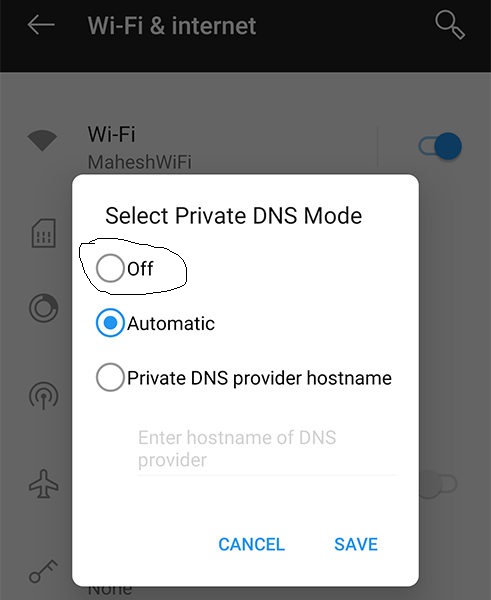
Disabling the private DNS on a mobile device will result in the restoration of internet connectivity.



If you want to know about the difference between 5G and 2.4G, click here.


Password is Amrita@2024


0 Comments

speed test

  Aum Namah Shivaya Sir/Madam..! Local Speed test click here  or Click here Internet speed Test Click here We have deployed a utility to measure the LAN bandwidth exclusively for the Amaravati Campus which is available with the URL  http:// speedtest .av.amrita.edu   or  http://172.21.18.17/ speedtest /  . Please access this URL with any webbrowser from the devices on which users are facing bandwidth issue and send the screen shot of the same to us. Please note, these URLs are available only from within the Amaravati campus network. Also access the online utiliity  https://www. speedtest .net/  for assessing the internet speed from the same device having bandwidth issue and send the screen shot so that we can analyse the issue more precisely.  If the speed is too slow, please conduct both the local speed test and the internet speed test, then send the screenshots via your official email to j_rajesh@av.amrita.edu and sysadmin@av.amrita.edu, wh...